Benefits of Filing Income Tax Return

Benefits of Filing Income Tax Return

Learn the key benefits of filing your Income Tax Return and Find Out why timely tax filing is crucial with Canara HSBC Life Insurance.

2024-07-09

11389 Views

4 minutes read

Tax is levied on your income once it surpasses a certain level. To pay the taxes, you have to file an Income Tax Return.

ITR is a form wherein you enter details regarding the income you have earned in the past financial year (1st April-31st march). Filing an ITR is important and applies to everyone be it a salaried individual, Partnership, or even a HUF.

Key Takeaways: 

  • Failure to file an ITR can result in penalties of up to ₹5,000 and additional interest charges on unpaid taxes.
  • The Income Tax Department may issue notices, leading to legal complications and further scrutiny.
  • Banks and financial institutions require ITR for loan approvals, credit cards, and visa applications.
  • Without filing an ITR, you cannot claim refunds for excess tax deducted from your income.
  • Skipping ITR filing can harm your tax records, making future rectifications and compliance difficult.
  • Filing an ITR allows access to deductions under sections like 80C, 80D, and 80E, helping reduce tax liabilities.

Begin securing your future

Please enter correct name Please enter the Full name
Please enter valid mobile number Please enter Mobile Number
Please enter valid email Please enter Email

Enter OTP

An OTP has been sent to your mobile number

Didn’t receive OTP?

Application Status

Name

Date of Birth

Plan Name

Status

Name of the policy holder

Policy Holder Name

Policy No.

Policy Number

Address of the Policyholder as per records

Address

Unclaimed Amount

Unclaimed Amount
Error

Sorry! No records Found

.  Please use this ID for all future communications regarding this concern.

Thank you for your interest in our product. Our financial expert will connect with you shortly to help you choose the best plan.

Key Benefits of Filing Your Income Tax Return

Filing income tax returns is often seen as a cumbersome process by the majority of the people. That is the reason why many decide to skip filing returns. As a responsible citizen, you need to make sure that you file your returns every year. This is a moral duty of every working Indian.

Filing ITR can be useful to you as well. Here are the various ways in which filing an Income Tax Return can benefit you.

1. It Acts as a Legal Document

Income Tax Return holds immense legal value. It is recorded with the government. It acts as legal proof in two ways,

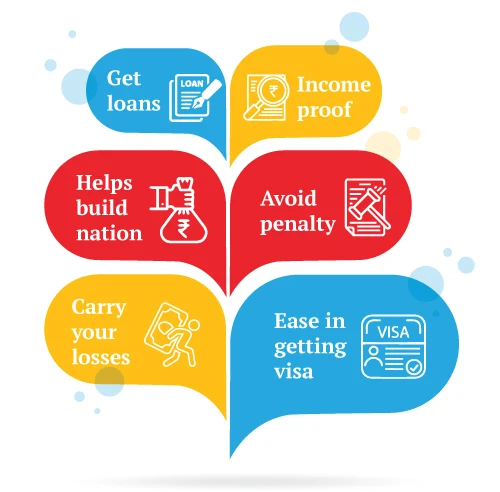
  • Identity Proof:-  The return that you fill can be used as identity proof in various scenarios such as while applying for an AADHAR card, or any other document. The government accepts it as a proof of address as well.
  • Income Proof:-  As discussed, the ITR form contains a detailed list of all your incomes and expenses. On this basis, the tax you have to file is calculated.

Thus, ITR can also be used as income proof as some transactions such as the purchase of property do require you to show proof of income.

This can come in handy for the ones who are self-employed and don't receive Form 16 .

2. Can help you Claim Deductions

To reduce the burden on the taxpayers and to encourage more people to pay their taxes, the government allows certain deductions to you.

  • These deductions and exemptions can be availed in some investments and thus help in reducing the tax you ultimately pay.
  • TDS and rebates can also be claimed back.

But to have access to these tax benefits, you are required to file an income tax return. If you have not filed ITR you cannot claim deductions as well.

3. Important Document While Applying for Loans

When you decide to apply for a loan to purchase something, say a car or a new home for your family or for business, the bank requires you to submit some documents such as

  • Aadhar card
  • PAN card
  • Driver's license
  • Photo ID etc

One important document asked is your income proof. Banks generally asked for ITR for the last three years. This is done to assess your past and current financial situation and whether you will be able to pay the loan or not.

Not only while applying for loans from the bank, but ITR can also be useful to get you a credit card as well. Credit card companies also ask for your past salary and returns before issuing you the card.

4. Helps if Planning to go Abroad

Going abroad involves some procedures to be followed. If you do not file your ITR, then it can deter your plans to go abroad. ITR form is one item in the list of the documents that are required by the countries that you want to visit.

This is because of the following:

  • Having a history of filing income tax returns helps your case and improves your chances of getting visa approval.
  • It gives details about your financial situation to the embassy.

5. Avoid Penalty and Punishment

The taxes that apply to you are governed by the Income Tax Act 1961. Thus, you are required to pay taxes if you fall above the exempt criteria.

So, if you are eligible to pay taxes on your income and yet still fail to file your Income Tax Returns, then you attract charges

The income tax officer can levy a penalty of up to Rs 5000 Rs. Other serious punishments can also occur if you do not file returns.

Thus, you should file ITR to be safe from such penalties and punishments.

6. Losses can be Carried Forward

Section 70 and 71 of The Income-tax Act 1961 contains some provisions for carrying forwarding losses of a particular year to the subsequent year. This means that you can move your loss to the next assessment year.

Here are a few examples:

  • Losses from house property can be carry-forward till the next 8 assessment years and can be set off from income from house property.
  • Loss from business can be carried forward and paid with the future income from the business.
    If you do not file an Income tax return, you cannot carry forward or set off your losses.

Filing of the Income-tax return not only helps you but also helps the nation. The tax that you pay is used by the government to build infrastructure and to improve other facilities of the nation such as medical, defence, etc.

The more people file, the more can government spend and provide us with a good country.

Also Read about - income tax refund

trivia-img

Did You know?

Regular ITR filing serves as legal proof of income and can be beneficial when applying for government tenders.


iSelect Guaranteed Future Plus

What Happens if You Don’t File an Income Tax Return?

Filing your Income Tax Return (ITR) comes with multiple advantages. However, many taxpayers neglect this responsibility, either due to a lack of awareness or the misconception that it's unnecessary.

But what happens if you skip filing your ITR? Let’s take a closer look:

  1. Legal Consequences and Penalties: The Income Tax Department imposes strict penalties on individuals who fail to file their returns. Under Section 234F of the Income Tax Act, a late fee of up to ₹5,000 can be levied if you miss the deadline. Moreover, if taxes are due, additional interest charges under Section 234A may also apply, increasing your financial burden.
  2. Loss of Financial Benefits: One of the major benefits of filing ITR is that it serves as proof of income, which is essential for obtaining loans, credit cards, and visas. Many banks and financial institutions require ITR documents for processing high-value transactions, and failure to file them could lead to difficulties in securing financial support when needed.
  3. Risk of Tax Notices and Scrutiny: The Income Tax Department actively monitors financial transactions. If you have taxable income but fail to file your ITR, you may receive a notice under Section 142(1) or Section 148, compelling you to submit your return. Ignoring these notices can result in further scrutiny and even prosecution in extreme cases.
  4. Inability to Claim Refunds: Another key benefit of an income tax return is that it allows you to claim refunds for excess tax paid. If TDS (Tax Deducted at Source) has been deducted from your salary or bank interest, you can only claim a refund by filing your ITR. Missing the deadline means forfeiting any excess tax that could have been rightfully yours.
  5. Impact on Future Tax Compliance: Consistently filing your ITR establishes a record of tax compliance, which can be beneficial in the long run. If you skip filing, it may affect your credibility with tax authorities and cause complications when you need to rectify past filings or update financial records.
  6. Stay Compliant and Reap the Benefits: The benefits of filing an ITR extend beyond just avoiding penalties. It offers financial credibility, facilitates smoother transactions, and ensures compliance with tax laws. If you haven't filed your ITR yet, it's best to do so as soon as possible to avoid unnecessary hassles and secure your financial future.

Tax-Saving Schemes You Can Avail with ITR Filing

Income Tax Return (ITR) isn’t just a legal requirement, it’s also a smart financial move. Many taxpayers overlook the benefits of filing ITR, especially when it comes to reducing tax liabilities. By filing your ITR on time, you can take advantage of multiple tax-saving schemes that help you retain more of your hard-earned money.

1. Deductions Under Section 80C

One of the biggest benefits of income tax return filing is the ability to claim deductions under Section 80C. You can reduce your taxable income by up to ₹1.5 lakh through investments in:

  • Public Provident Fund (PPF)

  • Employees’ Provident Fund (EPF)

  • National Savings Certificate (NSC)

  • Equity-Linked Savings Scheme (ELSS)

  • 5-Year Fixed Deposits (FDs) in Banks/Post Office

2. Health Insurance Tax Benefits (Section 80D)

Medical expenses can be unpredictable, but tax savings are certain if you invest in health insurance. Under Section 80D, you can claim deductions on health insurance premiums paid for yourself, your spouse, your children, or your parents. The deduction limits are:

  • ₹25,000 for self, spouse, and children

  • ₹50,000 if covering senior citizen parents

3. Home Loan Benefits (Section 80EE & 24(b))

If you have taken a home loan, filing your ITR ensures you can claim deductions on:

  • Principal Repayment (Under Section 80C): Up to ₹1.5 lakh

  • Interest on Home Loan (Under Section 24(b)): Up to ₹2 lakh

  • First-Time Homebuyer Benefits (Under Section 80EEA): Up to ₹1.5 lakh (for properties under ₹45 lakh)

4. Education Loan Benefits (Section 80E)

Education loans taken for higher studies (for self, spouse, or children) allow you to claim deductions on the interest component under Section 80E. Unlike other deductions, there is no upper limit, making it a great tax-saving tool.

5. National Pension System (NPS) Tax Benefits (Section 80CCD)

Contributions to the National Pension System (NPS) can help you claim additional tax deductions:

  • ₹1.5 lakh under Section 80C

  • Additional ₹50,000 under Section 80CCD(1B)

6. Maximise Your Tax Savings with ITR Filing

The benefits of income tax return filing go beyond compliance. It helps you save tax, secure financial benefits, and build wealth over time. By leveraging these tax-saving schemes, you can make the most of your earnings while ensuring you meet all legal obligations. Start early, plan wisely, and file your ITR on time to enjoy maximum savings!

Tax Savings - Top Selling Plans

We bring you a collection of popular Canara HSBC life insurance plans. Forget the dusty brochures and endless offline visits! Dive into the features of our top-selling online insurance plans and buy the one that meets your goals and requirements. You and your wallet will be thankful in the future as we brighten up your financial future with these plans.

How to File Your Income Tax Return Online? 

Income Tax Return (ITR) online has become a simple and convenient process, saving you from the hassle of paperwork and long queues. The benefits of filing ITR go beyond just compliance; it helps you claim tax refunds, apply for loans smoothly, and maintain financial transparency. If you’re new to the process, here’s a step-by-step guide to filing your income tax return online.

Step 1: Gather the Necessary Documents

Before you begin, make sure you have:

  • PAN Card

  • Aadhaar Card

  • Form 16 (for salaried employees)

  • Form 26AS (tax credit statement)

  • Bank account details

  • Investment and expense proofs (for deductions under 80C, 80D, etc.)

Step 2: Log in to the Income Tax Portal

Visit the official Income Tax e-Filing website (https://www.incometax.gov.in) and log in using your PAN, Aadhaar, or User ID. If you’re a new user, register first by providing your details.

Step 3: Select the Appropriate ITR Form

Choose the right ITR form based on your income source:

  • ITR-1 (Sahaj): For salaried individuals with income up to ₹50 lakh

  • ITR-2: For individuals with capital gains, multiple properties, or foreign income

  • ITR-3: For professionals and business owners

  • ITR-4 (Sugam): For individuals under the presumptive taxation scheme

Step 4: Fill in the Required Details

Enter details such as income from salary, house property, capital gains, and business profits. If you have investments or tax-saving expenses, claim deductions under sections like 80C, 80D, and 80G.

Step 5: Verify Tax Calculation and Pay Outstanding Taxes (if any)

Once the details are entered, the system automatically calculates your tax liability. If additional tax is due, make the payment via Net Banking, UPI, or debit card through the portal.

Step 6: Submit and Verify Your ITR

After reviewing the details, submit your income tax return online. The final step is e-verification, which can be done via:

  • Aadhaar OTP

  • Net Banking

  • Demat Account

  • Sending a signed ITR-V form to CPC, Bangalore

Conclusion

The benefits of filing ITR go beyond just tax compliance. From securing loans to smoother visa applications and carrying forward losses, filing your income tax return online ensures financial security and stability. Even if your income falls below the taxable limit, filing your ITR can still be advantageous in many ways. So, make it a habit to file your returns on time and enjoy these financial benefits!

Glossary

  1. Section 234F: A provision under the Income Tax Act that imposes a late fee for failing to file an income tax return before deadline.
  2. Tax Deducted at Source (TDS): Tax deducted during income payment, refundable only when the taxpayer files an income tax return.
  3. Section 80C: Allows individuals to claim deductions up to ₹1.5 lakh on investments like PPF, EPF, and ELSS to reduce taxable income.
glossary-img

Disclaimer - This article is issued in the general public interest and meant for general information purposes only. The views expressed in this blog are solely those of the writer and do not necessarily reflect the official policy or position of Canara HSBC Life Insurance Company Limited or any affiliated entity. We make no representations or warranties of any kind, express or implied, about the completeness, accuracy, reliability, suitability, or availability with respect to the blog or the information, products, services, or related graphics contained in the blog for any purpose. Any reliance you place on such information is therefore strictly at your own risk. You should consult with a qualified professional regarding your specific circumstances before taking any action based on the content provided herein.

Recent Blogs

Will Budget 2026 Allow Joint Taxation for Married Couples?
29 Jan '26
8 Views
8 minute read
Find out what Budget 2026 may introduce on joint taxation for married couples, expected benefits, policy outlook, and how it may impact taxpayers in India.
Read More
Tax Saving
What is Income Tax Return (ITR)? Meaning & Filing Process of Filing ITR
21 Jan '26
4898 Views
10 minute read
Learn what an Income Tax Return (ITR) is, why filing your income tax return is important, and how to file your ITR online via the Income Tax Department. Documents, forms, steps, and FY 2026-27 details included.
Read More
Tax Saving
What Is Advance Tax? How to Calculate Advance Tax and Pay It Online
20 Jan '26
2513 Views
9 minute read
Understand advance tax under income tax, who should pay it, how advance tax is calculated, due dates, and online payment steps to avoid penalties.
Read More
Tax Saving
Importance of Taxes in India: Why Taxes Matter?
15 Jan '26
1609 Views
7 minute read
Understand the importance of taxes in India, how they support public services, economic growth, welfare schemes, and national development.
Read More
Tax Saving
What Is SGST? Meaning, Rates & Applicability Explained
15 Jan '26
627 Views
5 minute read
Learn what SGST means, its full form, tax rates, applicability, and how it works under the GST system for intra-state transactions.
Read More
Tax Saving
What is the GST Council? Role, Members & How It Works
14 Jan '26
538 Views
5 minute read
Understand what the GST Council is, its structure, powers, and how it decides GST rates, laws, and policies across India.
Read More
Tax Saving
Why is Your ITR Refund Delayed and What Can You Do?
13 Jan '26
535 Views
5 minute read
ITR refund delayed? Know the common reasons, timelines, and step-by-step actions to track, raise grievances, and speed up your income tax refund.
Read More
Tax Saving
80CCC: What is Deduction Under Section 80CCC?
11 Jan '26
1180 Views
6 minute read
What is Section 80CCC? How can you claim deductions under section 80CCC? Learn the eligibility criteria to claim a deduction under section 80CCC with a life insurance policy.
Read More
Tax Planning
How to Save Tax on Salary Above ₹15 Lakhs? | Tax Saving Guide 2026
10 Jan '26
4813 Views
14 minute read
Learn how to save tax on salary above ₹15 lakhs using effective tax saving options, deductions, exemptions, and smart income tax planning strategies
Read More
Tax Saving